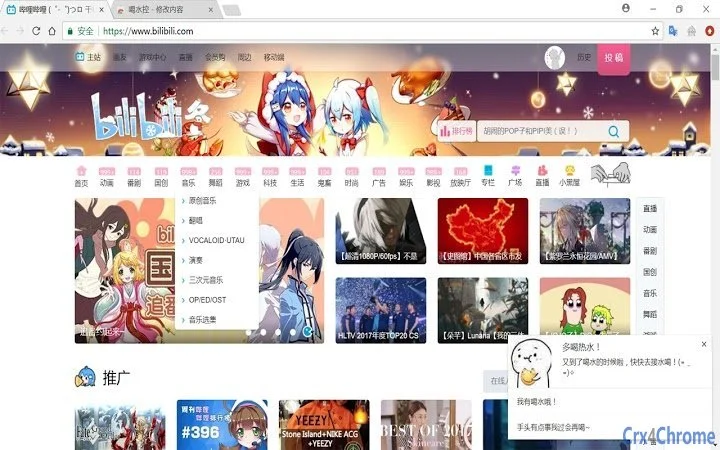

Stay Hydrated with Smart Reminders
Overview
The software is designed to help users maintain proper hydration by delivering timely reminders to drink water. It targets individuals who frequently engage in long computer sessions—such as remote workers, students, or binge-watchers—who may unintentionally neglect their fluid intake. The core purpose is to address the common issue of dehydration caused by prolonged screen time and lack of routine awareness. By integrating into daily workflows, the tool aims to support long-term health and wellness without disrupting productivity.
Target users include professionals managing extended work hours, digital content consumers, and anyone seeking simple, automated assistance in adopting healthier habits. The developer, 大大大大西瓜, has positioned the application as a personal wellness assistant with a focus on user convenience and behavioral nudging. Real-world usage scenarios include use during online meetings, late-night study sessions, or extended gaming and streaming periods. The tool operates in the background, minimizing interruptions while ensuring consistent hydration cues.
Key Features & Capabilities
- Hourly Hydration Reminders – The software sends a notification every hour to prompt the user to drink water. This regular interval is intended to build a sustainable habit without overwhelming the user.
- Flexible Delay Option – If a user cannot respond immediately, they can choose to delay the reminder. This feature respects user schedules and reduces frustration during busy moments.
- Escalated Reminder Mode – After a delay, the system transitions into a more frequent alert cycle, reminding the user every five minutes until hydration is acknowledged. This ensures that the reminder is not ignored or forgotten.
- Background Operation – The application runs silently in the background, consuming minimal system resources and not interfering with other tasks.
These features are particularly useful for users who lose track of time while working or consuming media. For example, a user attending a virtual conference may forget to hydrate due to focus, but the tool ensures they receive periodic cues. Similarly, someone watching a series might miss breaks, but the escalating alerts help prevent prolonged inactivity. The design emphasizes simplicity and reliability, making it accessible even to non-technical users.
User Interface, Workflow & Performance
The user interface is minimal and unobtrusive, aligning with the software’s goal of seamless integration into daily routines. Notifications appear as standard system alerts, ensuring visibility without disrupting workflow. Navigation is straightforward: users interact only with the reminder pop-up, selecting either to acknowledge the reminder or delay it. No additional settings or menus are required, which simplifies the user experience.
Workflow efficiency is optimized for passive use—once installed, the software operates autonomously. Users do not need to open the application to receive or manage reminders. The system is designed to require no ongoing input, reducing cognitive load. Performance details were not specified by the developer, but based on its small file size and background operation, it is expected to have low impact on CPU and RAM usage. The developer did not provide additional system requirements or stability reports.
Compatibility & System Requirements
The software is compatible with both Windows and Mac operating systems, supporting a broad range of desktop users. It is available in version 1.0, with a compact installation size of 1.5 MB, indicating a lightweight and efficient design. The developer did not specify exact hardware requirements, such as minimum RAM or processor speed, nor did they list supported versions of Windows or macOS beyond the general platform names.
Compatibility information was partially provided. Users should ensure their system meets standard desktop application requirements to run the software. The developer did not disclose whether the tool supports older OS versions or specific hardware configurations. No performance benchmarks or resource usage data were included in the release notes.
Pros and Cons
Pros
- Simple, intuitive interface with minimal user interaction
- Effective reminder system with escalation logic
- Lightweight design (1.5 MB) with low resource consumption
- Available for both Windows and Mac platforms
- Free to use with no hidden costs
Cons
- No customization options for reminder frequency or message tone
- Limited feature set in initial release
- No data tracking or hydration statistics available
- Developer did not provide detailed system requirements
- Future updates and roadmap details are not publicly documented
FAQ Section
Is this software compatible with my operating system?
The software supports both Windows and Mac operating systems. Specific version compatibility was not detailed by the developer.
Is the software safe to install and use?
As a desktop application with a small file size and no known security issues reported, it is considered safe for general use. Users should download it from official sources.
How often does the software remind me to drink water?
The software sends a reminder every hour. If delayed, it switches to a five-minute interval until the user acknowledges the reminder.
Can I customize the reminder message or frequency?
Currently, the software does not offer customization for reminder messages or intervals. Future updates may include these features.
Is an internet connection required to use this tool?
The software operates offline and does not require an internet connection to deliver reminders. It functions entirely within the local system.
Final Thoughts + CTA
Staying hydrated is a simple yet vital habit often overlooked in the digital age. This desktop tool offers a practical, no-frills solution for users who struggle to remember to drink water during long screen sessions. With its intelligent escalation system and minimal interface, it effectively bridges the gap between awareness and action. While the current version lacks advanced features like data tracking or customization, its core functionality is reliable and well-executed.
For professionals, students, and media consumers who frequently lose track of time, this tool delivers real value without complexity. Its free status and broad OS support make it accessible to a wide audience. The developer has laid a solid foundation, and future enhancements could further elevate its utility.
Download Stay Hydrated with Smart Reminders now and take a proactive step toward better health.







